
By Claus Hetting, WiFi NOW CEO & Chairman
Puncturing and multiple resource units (MRUs) are standard features of Wi-Fi 7 that have lived largely in the shade of the bigger ‘marquee’ Wi-Fi 7 features such as MLO, 320 MHz channels, and 4kQAM. As it turns out, MRU and puncturing deliver significant latency improvements over Wi-Fi 6, Cisco says. Test results were released in a recent blog by among others Shreyas Trivedi, Technical Leader Wireless at Cisco. The blog is available here.
Unless you’re a Wi-Fi 7 aficionado you may not be aware that puncturing and MRU allocation are standard features of Wi-Fi 7 supported by – for example – Cisco Wi-Fi 7 network solutions as well as Qualcomm and Intel Wi-Fi 7 client-side chipsets. Thus far not a lot has been revealed about these features – that is, until Cisco’s Shreyas Trivedi and Nilesh Doshi, Senior SW AP Manager, released this blog last month.
It turns out that puncturing and MRU deliver significantly lower latencies especially in congested environments. Shreyas Trivedi likens this to organising rush hour traffic on a busy freeway better. “OFDMA – which was introduced in Wi-Fi 6 – is like dividing up the freeway into many lanes allowing cars to travel side by side. MRU in Wi-Fi 7 means guiding vehicles into express lanes to further reduce congestion and ensure a smoother journey for all, even in heavy traffic,” he says.
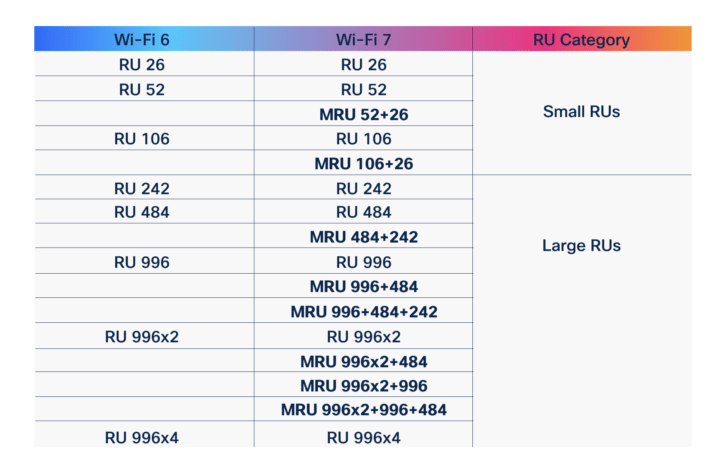
The puncturing part of the feature makes sure that heavily congested (interference-ridden) RUs are avoided while instead, several RUs can be selected from available subcarriers to service each client. In many cases this delivers better transmission efficiency, which results in lower latency. “MRU allows the aggregation of RUs of varying sizes to better match transmission needs, which drives up efficiency,” Shreyas Trivedi says.
To test the impact of puncturing and MRU allocation Cisco used four Wi-Fi 7 and four Wi-Fi 5 clients connected to a Catalyst 9178 AP and the Catalyst 9800 controller. Traffic was generated by pushing UDP packets continuously to the AP using the Wi-Fi 5 clients. The results are shown below for the downlink direction (uplink results were very similar).
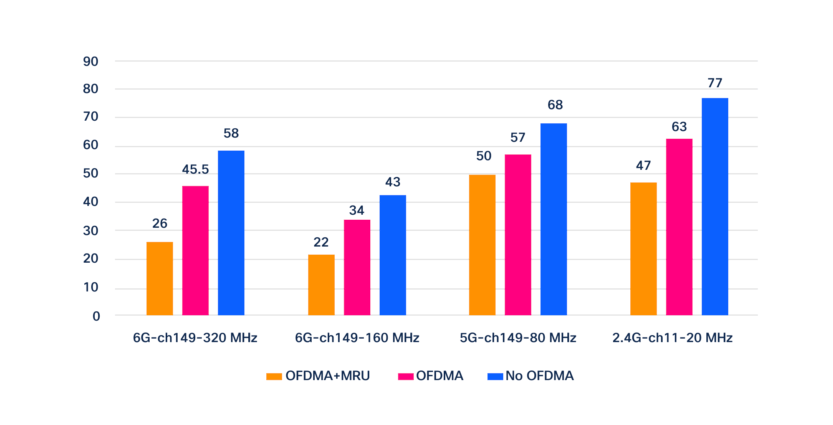
“MRU revolutionises next-generation wireless connectivity by boosting efficiency, increasing speed, and ensuring enhanced reliability – even and especially in high-density environments such as offices, airports, and stadiums, as well as IoT networks with cameras and sensors. We’re only just starting to understand and come to terms with how big the benefit really is,” Shreyas Trivedi says.
Cisco says that all Cisco Wi-Fi 7 access points – including CW9178I and CW9176I and Cisco Catalyst 9800 Series Wireless Controllers – fully support MRU functionality starting with the IOS XE 17.15.2 release. For more details about the concept of RUs see this blog.

/Claus.