
By Claus Hetting, WiFi NOW CEO & Chairman
If your home broadband service is capped at 1 Gbps, does it make sense to invest in PCs with multi-gigabit Wi-Fi capability? And can you even get close to 1 Gbps Wi-Fi speeds in your home in a reasonable amount of locations? Intel’s Senior Director Wireless Marketing Carlos Aguirre spent a weekend trying to answer these questions from the consumer’s point of view at his Scottsdale, Arizona home. The difference made by the 6 GHz band and Wi-Fi 7 may surprise you. Here’s what he found.
Plenty of homes – particularly in the US – now subscribe to 1 Gbps fibre-based broadband services. Meanwhile, plenty of PC models with Wi-Fi 6 and Wi-Fi 7 capability promise beyond 1 Gbps peak speeds with some even promising speeds of beyond 5 Gbps. Ideally, your 1 Gbps Wi-Fi service should be everywhere across your home (it’s not, of course) while – also in theory – any PC with better than 1 Gbps peak Wi-Fi performance should suffice to extract maximum speed and value from your broadband service.
All of this is theory. In practice, it matters a great deal what Wi-Fi version and configuration you choose for your PC – even among models that promise better than 1 Gbps peak speeds. Intel’s Senior Director Wireless Marketing Carlos Aguirre recently discovered this over a weekend of Wi-Fi testing in his home. He wanted to finally find out what kinds of Wi-Fi speeds he was getting in different parts of his house and why. The results show features really do make a difference from the consumer’s point of view.

Carlos Aguirre tested Wi-Fi 6, Wi-Fi 6E, and Wi-Fi 7 technologies across 5 GHz and 6 GHz bands, using 80 MHz, 160 MHz, and 320 MHz channel configurations. He selected eight locations around the house, including an outdoor patio, and averaged the top five download speed results for each test case. “What began as a simple curiosity quickly turned into a full weekend project. After repeated speed tests, Wi-Fi card swaps, and requests that nobody in the family use the network until I was finished, I became – briefly – the least popular person in the house. But the results were worth it,” he says.
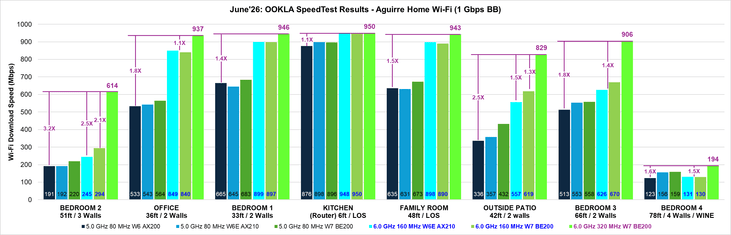
Some of the results (see graphic above) were as expected but it may surprise how much of a difference Wi-Fi 7, 6 GHz, and especially wider channels make. “My testing showed that the Intel Wi-Fi 7 solution supporting 6 GHz and 320 MHz channels provided the performance headroom needed to help deliver more of the broadband speed I was already paying for across more of my home. And the performance gap widens as soon as you leave the kitchen where the router is located,” Carlos Aguirre says.
He also found a solution for the ‘problem room’ furthest to the right on the graphic above – his son’s room – which was roughly located furthers away behind a wall with a built-in wine rack. The wine rack seems to have contributed with a lot of attenuation. “In the original problem room, performance improved from below 200 Mbps to more than 920 Mbps for 6 GHz client connections after adding the satellite extender and selecting the right backhaul configuration,” Carlos Aguirre said. The configuration involved running the extender backhaul on 5 GHz and using Wi-Fi 7 and 6 GHz to connect his son’s PC.
Conclusion? “The Intel Wi-Fi 7 solution supporting 6 GHz and 320 MHz channels consistently delivered the strongest overall results and often maintained speeds much closer to the maximum broadband performance available in my home. In the most challenging room, adding a Wi-Fi 7 extender and optimizing the backhaul created a dramatic improvement,” Carlos Aguirre says. Read the full blog with all the detailed test results here.
/Claus.