
By Claus Hetting, WiFi NOW CEO & Chairman
What performance do you get when you connect a state-of-the-art Wi-Fi 7 client – for example a brand new Intel-powered notebook – to a legacy Wi-Fi 6 router? And what happens in the opposite case? Remarkably, both cases produce significantly better results than Wi-Fi 6 alone when you’re at range, Intel says. But of course, 6 GHz makes a huge difference – especially together with Wi-Fi 7 and when backhaul bitrate restrictions go away.
Brand new test results from Intel’s wireless lab in Oregon (and if you’ve had the privilege of visiting that lab you know how meticulous they are) show that yes, Wi-Fi 7 does matter even if you don’t yet own a Wi-Fi 7 router at home and you’re still running Wi-Fi 6. Conversely, running a Wi-Fi 6 client against a new Wi-Fi 7 router also yields significantly better performance. It’s a little surprising but yes, it’s true.
Intel’s test results highlight the potential benefits that users may see when upgrading client and home network hardware. “In addition to introducing new features that deliver significant gains when paired with similarly capable next-generation devices, newer products often incorporate design improvements and optimisations that enhance performance with legacy devices as well – an effect which is clearly evidenced by our results,” says Carlos Aguirre, Senior Director Wireless Marketing at Intel.
Intel says that a new Intel Wi-Fi 7 client on a legacy Wi-Fi 6 network can perform better than older Wi-Fi 6 clients. Also, a new dual-band Wi-Fi 7 router can help Intel Wi-Fi 6 and Wi-Fi 7 clients perform even better. Meanwhile, it is of course true that a tri-band Wi-Fi 7 router can deliver dramatic performance improvements with new Intel Wi-Fi 7 clients.
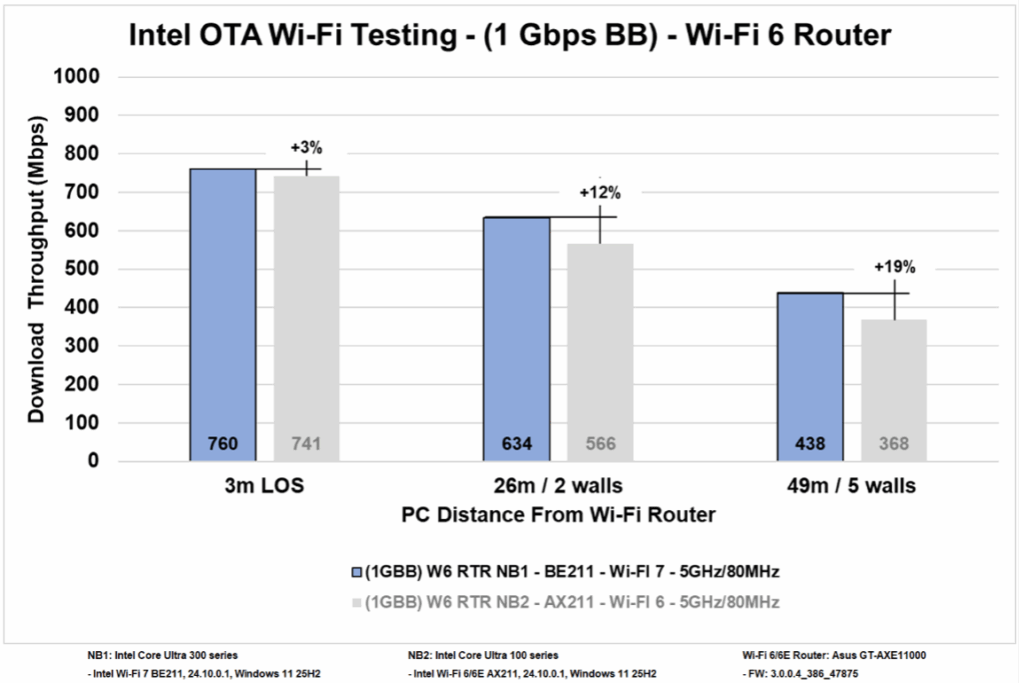
The results of Intel’s recent Over-The-Air (OTA) Wi-Fi testing are shown in the charts below. The first chart shows test results for an Intel Core Ultra (Series 3) notebook equipped with Intel Wi-Fi 7 compared to an Intel Core Ultra (Series 1) notebook configured with Intel Wi-Fi 6. In both cases, the clients are connected to the same legacy Wi-Fi 6 router using the 5 GHz band and 80 MHz channels while backhauled by a 1 Gbps broadband connection. The benefit arises (in this case up to 19%) once the Wi-Fi 7 client is positioned relatively far from the Wi-Fi 6 router and when signals need to pass through walls.
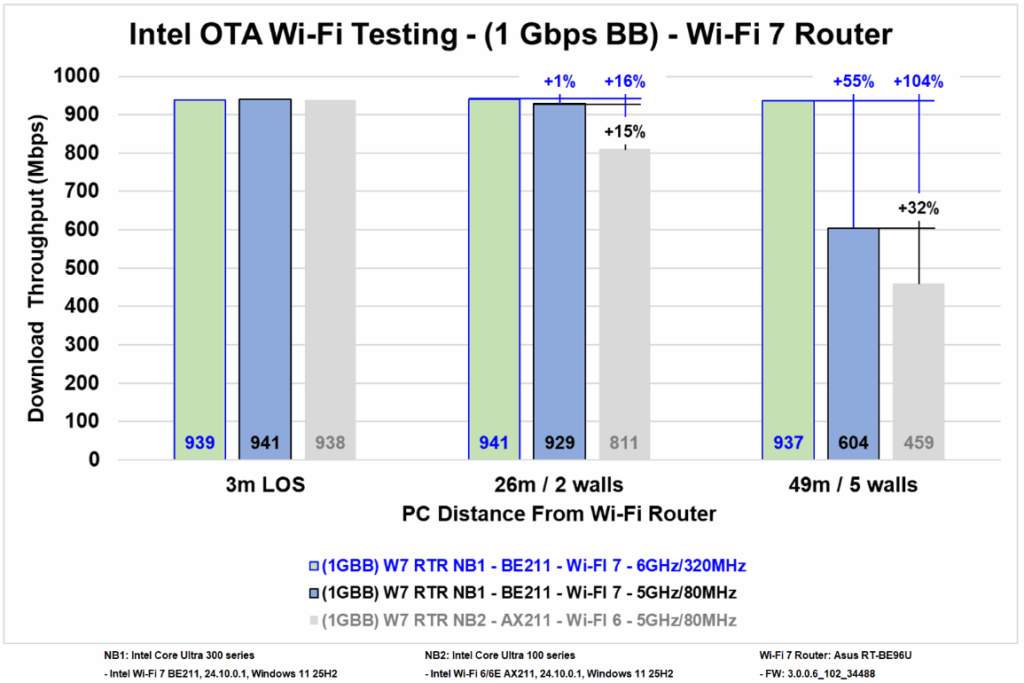
Conversely (see below) a Wi-Fi 6 client does substantially better when connected to a Wi-Fi 7 router (in 5 GHz Wi-Fi 6-mode) . The Wi-Fi 7 client does 30% better than the Wi-Fi 6 client when using the 5 GHz band in Wi-Fi 7 mode, while adding 6 GHz boosts Wi-Fi 7 performance by more than 100% over Wi-Fi 6. In all cases, the results show that the differences are pronounced when signals have to traverse many meters of distance and need to contend with one or more walls. The performance of Wi-Fi 7 in 6 GHz with 320 MHz channels shows little degradation compared to the 1 Gbps broadband speed cap at all test locations.
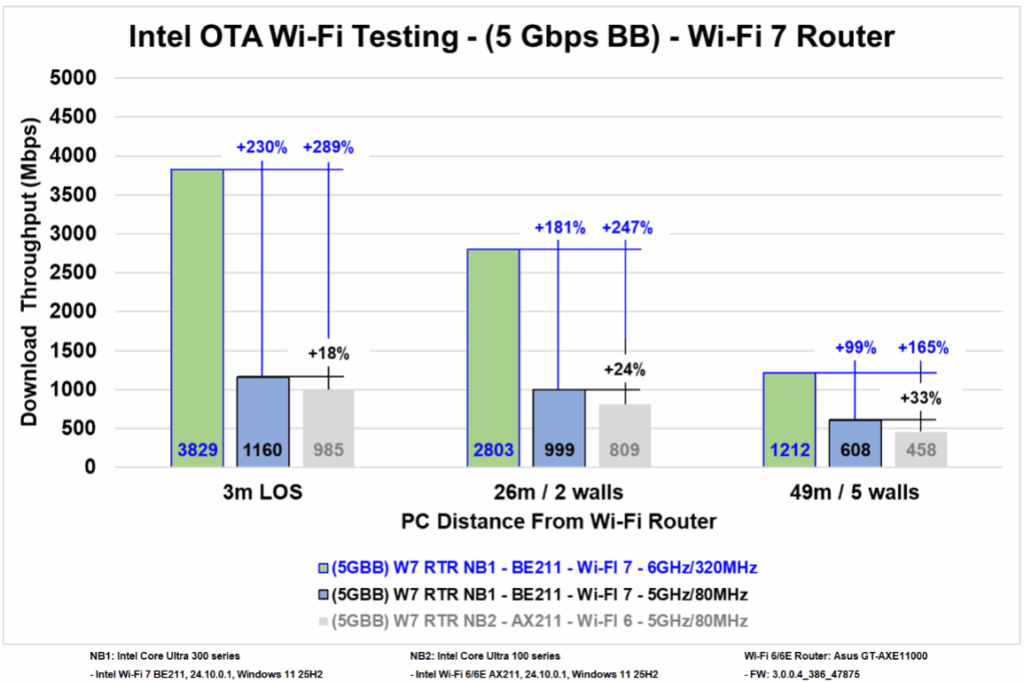
Last but not least: Removing backhaul restrictions – meaning increasing backhaul to 5 Gbps – delivers dramatically better results because Wi-Fi PHY is no longer hard limited. This is – as expected – especially the case when using a Wi-Fi 7 client and router operating in the 6 GHz band. The chart below shows how Wi-Fi 7 performance using 6 GHz (320 MHz channel) beats Wi-Fi 7 5 GHz-only performance by a whopping 230% at close range. The performance hike drops to around 100% when signals have to contend with walls and distances. Compared to the legacy Wi-Fi 6 (5 GHz) client, Wi-Fi 7 hikes performance by 165% to 289%, Intel says.
The Intel Core Ultra Series 3 (also called Panther Lake) mobile PC platform – equipped with the new Intel Wi-Fi 7 BE211 card referenced in the tests above – was launched at CES26 last week and will be available in stores in late January, Intel says. For more about the latest Intel Wi-Fi 7 client platform read here.
/Claus.